Showing posts with label EPiServer. Show all posts

Monday, October 9, 2017

Custom Property In EPiServer And EPiFInd Indexing

In one of our project we had to build the autosuggest property. However, the default type of autosuggest property is string but we wanted to store custom object so we can index through EPiFind with additional values.

Therefore, we implemented custom class to store additional values and also needed JsonConverter for 2 reasons

  1. Convert Class to String for Dojo Framework so existing autosuggest property works as expected
  2. Convert and index object for EPiFind differently
We will delimte the value of autosuggest property with '-' to break it into multiple property and save it and index it properly.

Define the property


[BackingType(typeof(PropertyTag))]
[Display(Order = 45, Description = "Select competition to filter the contents of the page")]
[AutoSuggestSelection(typeof(TagSelectionQuery), AllowCustomValues = false)]
public virtual Tag Competition { get; set; }


Define the PropertyTag Class


    [PropertyDefinitionTypePlugIn(Description = "A property to tag content", DisplayName = "Tag")]
    [JsonConverter(typeof(TagJsonConverter))]
    public class PropertyTag : PropertyLongString
    {
        public override PropertyDataType Type => PropertyDataType.LongString;

        public override Type PropertyValueType => typeof(Tag);

        public override object Value
        {
            get { return Tag.Parse(base.Value?.ToString()); }
            set { base.Value = value?.ToString(); }
        }

        public override object SaveData(PropertyDataCollection properties)
        {
            return this.LongString;
        }
    }


Define the JsonConverter


 internal class TagJsonConverter : JsonConverter
    {
        public override bool CanConvert(Type objectType)
        {
            return true;
        }

        public override object ReadJson(JsonReader reader, Type objectType, object existingValue, JsonSerializer serializer)
        {
            if (reader.Value is Tag tag)
                return tag;

            return new Tag(reader.Value.ToString());
        }

        public override void WriteJson(JsonWriter writer, object value, JsonSerializer serializer)
        {
            if (value == null)
            {
                writer.WriteNull();
                return;
            }

            if (writer is MaxDepthJsonWriter && value is Tag tag)
            {
                writer.WriteStartObject();
                writer.WritePropertyName($"Text{TypeSuffix.String}");
                writer.WriteValue(tag.Text);
                writer.WritePropertyName($"Value{TypeSuffix.String}");
                writer.WriteValue(tag.Value);
                writer.WriteEndObject();
                return;
            }

            if (value is Tag itag)
            {
                writer.WriteValue(itag.ToString());
            }
            else
            {
                writer.WriteValue(value.ToString());
            }
        }
    }


Define Tag Class


 [JsonConverter(typeof(TagJsonConverter))]
    public class Tag
    {
        private string text;
        private string value;
        private string tag;
        private bool isLoaded;

        public string Text
        {
            get
            {
                if (!isLoaded)
                    Load();

                return text;
            }

            set
            {
                text = value;
            }
        }

        public string Value
        {
            get
            {
                if (!isLoaded)
                    Load();

                return value;
            }

            set
            {
                this.value = value;
            }
        }

        public Tag()
        { }

        public Tag(string tag)
        {
            this.tag = tag;
        }

        public Tag(string value, string text)
        {
            isLoaded = true;
            this.value = value;
            this.text = text;
        }

        public string GetId(string type) => Value?.Substring(type.Length);

        public override string ToString()
        {
            return $"{Value}{ "-" }{Text}";
        }

        private void Load()
        {
            isLoaded = true;
            if (!string.IsNullOrWhiteSpace(tag))
            {
                var parts = tag.Split(new[] { "-" }, 2);
                if (parts.Length == 1)
                {
                    text = parts[0];
                    value = string.Empty;
                }
                else
                {
                    value = parts[0];
                    text = parts[1];
                }
            }
        }

        public static Tag Parse(string tag)
        {
            return string.IsNullOrWhiteSpace(tag) ? null : new Tag(tag);
        }
    }

Define TagSelectionQuery


    [ServiceConfiguration(typeof(ISelectionQuery))]
    public class TagSelectionQuery : ISelectionQuery
    {
        private const int Depth = 0;

        protected virtual string Prefix { get; } = Constants.Tags.Competition;

        public IEnumerable GetItems(string query)
        {
            /* Return List Of Select Items With Value Delimited by '-' For value and text of tag
        }

        ///         /// Will be called when initializing an editor with an existing value to get the corresponding text representation.
        ///         public ISelectItem GetItemByValue(string value) => /* Return SelectItem */;
    }


Pro Tip: Make Sure Admin For Property Looks Like below

Tuesday, August 29, 2017

View Trash Content Specific To Site For User in EPiServer

In one of our project we had very strict access rights policy for EPiServer projects.
We had about 16 sites and each of the sites had editor which could not see the content of other sites.

We had proper access rights setup on site hierarchy but Recycle Bin EPiServer sits inside the Root Page. The root page and recycle bin had access to everyone therefore, editors could see the deleted content of other editors. Therefore, we had to come up with some approach to restrict the content in recycle bin to editor of that specific site.

What we decided to create virtual role and make sure content is linked to logged in user site.
As the actual content is physically moved underneath the recycle bin. Therefore, there was no way to find the actual site information. However, before deleting content and moving it to under recycle bin EPiServer saves the actual parent deleted content in Dynamic Data Store named ParentRestoreEntity  and can use IParentRestoreRepository to fetch parent link. You can check the view dbo.VW_EPiParentRestoreStore on database as well.


In order to figure out whether, user has access to deleted content. we will fetch the original parent of deleted content and make sure logged in user has access to that parent content validating that the current logged in user has access to this deleted content as well.

Below is the Virtual Role that we created

 namespace NRL.Web.Business.VirtualRoles
{
    using System.Security.Principal;
    using EPiServer.Core;
    using EPiServer.DataAbstraction;
    using EPiServer.Security;
    using EPiServer.Web;
    using NRL.Shared.Extensions;
    using NRL.Web.Business.Extensions;
    using NRL.Web.Business.Models.Pages;
    using EPiServer.Filters;

    public class SiteTrashRole : VirtualRoleProviderBase
    {
        private IVirtualRoleRepository _repository;
        private IParentRestoreRepository _parentRestoreRepository;
        private ISiteDefinitionResolver _siteDefinitionResolver;

        private const string DefaultRoleName = "SiteTrashRole";
        private static string _roleName;

        public override string Name
        {
            get
            {
                return base.Name ?? "SiteTrashRole";
            }

            set
            {
                base.Name = value;
            }
        }

        /// <summary>Gets or sets gets the name of the role.</summary>
        /// <value>The name of the role.</value>
        public static string RoleName
        {
            get
            {
                return SiteTrashRole._roleName ?? (SiteTrashRole._roleName = "SiteTrashRole");
            }

            set
            {
                SiteTrashRole._roleName = value;
            }
        }

        /// <summary>
        /// Creates a new instance of <see cref="T:EPiServer.Security.CreatorRole" /></summary>
        public SiteTrashRole(IVirtualRoleRepository repository, IParentRestoreRepository parentRestoreRepository, ISiteDefinitionResolver siteDefinitionResolver)
        {
            this.EnableIsInRoleCache = false;
            this.SupportsClaims = false;
            this._repository = repository;
            this._parentRestoreRepository = parentRestoreRepository;
            this._siteDefinitionResolver = siteDefinitionResolver;
        }

        /// <summary>
        /// Determines whether the specified principal is a member of this role.
        /// </summary>
        /// <param name="principal">The principal.</param>
        /// <param name="context">The context.</param>
        /// <returns>
        /// <c>true</c> if the specified principal is in the virtual role; otherwise, <c>false</c>.
        ///     </returns>
        /// <note>
        /// Any implementation of IsInVirtualRole must be fully thread-safe since only one instance of the class
        /// is created and any role checks are made against the same instance.
        /// </note>
        public override bool IsInVirtualRole(IPrincipal principal, object context)
        {
            if (!principal.Identity.IsAuthenticated)
                return false;

            if (context is ContentAccessControlList cacl)
            {
                if (cacl.ContentLink == ContentReference.WasteBasket)
                    return true;

                var originalParentLink = _parentRestoreRepository.GetParentLink(cacl.ContentLink);

                /* Check parent access */
                var parentContent = originalParentLink?.Get<IContent>();

                if (parentContent == null)
                    return false;

                if (parentContent.QueryDistinctAccess(AccessLevel.Read))
                    return true;
            }

            return false;
        }
    }
}


The Recylce bin role setup looked like

  <virtualRoles addClaims="true">
      <providers>
         <add name="SiteTrashRole" type="NRL.Web.Business.VirtualRoles.SiteTrashRole, NRL.Web.Business" />
      </providers>
    </virtualRoles>    


Now, when user opens up the recycle bin then it will see content of site it belonged to.


@Note: We have give only read/change access to editors so they can see the lists. The restore and delete would not work as it requires delete access rights. The problem with given delete access rights is that delete button becomes enabled and then editor would be able to delete content of other sites.
If you try to restore you will get below message

Thursday, May 11, 2017

Enabling Opening Of Image Editor With Single/Double Click For Image Property in EPiServer

In one of our project we had to extend functionality to extend the content selector feature to enable to open up the image editor with single/double. The reason for extending feature is to enable quick access to image editor instead of browsing through right hand panel.


How it is look like


Defining Image Porpety as ContentReference


        [UIHint(UIHint.Image)]
        [Display(Order = 40)]
        public virtual ContentReference Image { get; set; }


Extending Image Property Descriptor


 /// 
    /// Extends functionality of image content selector to open up image editor on single/double click
    /// 
    [EditorDescriptorRegistration(TargetType = typeof(ContentReference), UIHint = UIHint.Image)]
    public class ImageEditorDescriptor : EditorDescriptor
    {
        public override void ModifyMetadata(ExtendedMetadata metadata, IEnumerable attributes)
        {
            metadata.ClientEditingClass = "Murtaza/Editors/ImageContentSelector/Editor";

            base.ModifyMetadata(metadata, attributes);

        }
    }


Defining Javascript class

In module.config the path to Resources/Scripts is defined as Murtaza and
inside Resources/Scripts. I have Editors -> ImageContentSelector -> Editor.js
therefore,  the ClientEditingClass is Murtaza/Editors/ImageContentSelector/Editor


<dojo>
    <paths>
      <add name="Murtaza" path="Resources/Scripts">
    </add></paths>
  </dojo>


Extending Dojo Functionality


define([
    "dojo/_base/declare",
    "dojo/dom-style",
    "dojo/aspect",
    "epi-cms/widget/ContentSelector"
],

/* Extends functionality of image content selector to open up image editor on single/double click */
    function (
        declare,
        domStyle,
        aspect,
        ContentSelector
    ) {
        return declare([ContentSelector], {

            postCreate: function () {
                this.inherited(arguments);

                /* Display node is the attach point of outer div */
                this.displayNode.addEventListener("click", this.openImageEditor.bind(this))
                this.displayNode.addEventListener("dbclick", this.openImageEditor.bind(this))

            },

            _updateDisplayNode: function (content) {

                /* Inherited from _SelectorBase through ContentSelector */
                this.inherited(arguments);

                /* Saving it for later to extract content id to form uri */
                this.content = content;
            },

            openImageEditor: function (e)
            {
                if (this.content && this.content.uri) {
                    var contextParameters = { uri: this.content.uri };
                    dojo.publish("/epi/shell/context/request", [contextParameters, { sender: this }]);
                }
            },

        });
    });


In order to load another content in edit mode we need to send request using dojo.publish function.

Wednesday, April 26, 2017

EPiServer Custom XForm Column Download Control - Dojo Control


In one of our project, we had requirement to download custom column in csv through XForm. XForm itself has built-in feature to download csv file but it downloads all columns and with existing built-in column such as PostedDate.
Client wanted to download only selected columns even though we were recording lots of information in XForm.

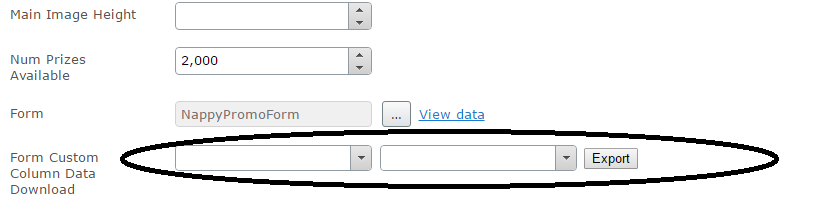
I have built small Dojo Control which enables you to filter data by date using built-in dojo date control and includes columns only that are pre-defined during development. We can extend control to allow to provide additional columns on the fly.

How it is look likes


How to define property


[BackingType(typeof(PropertyXFormCustomColumnDownloadButton))]
[EditorDescriptor(EditorDescriptorType = typeof(XFormCustomColumnDownloadButtonEditorDescriptor))]
[XFormReferencedProperty("Form", "RewardNappyPromoData", "FirstName", "LastName", "AddressLine1", "AddressLine2", "Suburb", "City", "Option")]
[Display(Order = 66)]                                  
public virtual XFormCustomColumnExport XFormDownload { get; set; }


PropertyXFormCustomColumnDownloadButton

This is backing type class to enable the storage of value. We are not saving any value for this as this is just control to download existing records. But we can extend this to store list of columns that need to be exported.


[PropertyDefinitionTypePlugIn(Description = "A property to show button to custom download xfrom column", DisplayName = "Download XForm Data")]
    public class PropertyXFormCustomColumnDownloadButton : PropertyString
    {
        public override Type PropertyValueType
        {
            get { return typeof(XFormCustomColumnExport); }
        }
        public override object SaveData(PropertyDataCollection properties)
        {
            return String;
        }
        public override object Value
        {
            get { return new XFormCustomColumnExport(); }
            set { base.Value = value; }
        }
        public override IPropertyControl CreatePropertyControl()
        {
            //No support for legacy edit mode
            return null;
        }
    }


XFormCustomColumnDownloadButtonEditorDescriptor

This is editor descriptor to let EPiServer know what Js file to load and how to show the control. And set any predefined values that need to be passed to JS file so we can pass back those value from js to server during export.


/// <summary>
    /// Register an editor for XForm custom column download
    /// </summary>
    [EditorDescriptorRegistration(TargetType = typeof(XFormCustomColumnExport))]
    public class XFormCustomColumnDownloadButtonEditorDescriptor : EditorDescriptor
    {
        public const string Form_ID = "FormId";
        public const string Included_Columns = "IncludedColumns";
        public const string XForm_Export_Url = "XFormCustomColumnExportUrl";
        public const string Export_FileName = "ExportFileName";
        public XFormCustomColumnDownloadButtonEditorDescriptor()
        {
            ClientEditingClass = "template.editors.XFormCustomColumnDownload";
        }
        protected override void SetEditorConfiguration(ExtendedMetadata metadata)
        {
            var xFormReferencedPropertyAtt =
                metadata.Attributes.FirstOrDefault(f => f.GetType() == typeof(XFormReferencedPropertyAttribute)) as
                    XFormReferencedPropertyAttribute;
            if (xFormReferencedPropertyAtt != null)
            {
                /* Load xform property to get xform id */
                var propertyData = metadata.Model as PropertyData;
                if (propertyData != null)
                {
                    /* Load the Referenced XForm property to fetch the id */
                    var xForm = propertyData.Parent.GetPropertyValue<XForm>(xFormReferencedPropertyAtt.XFormReferencedPropertyName);
                    if (xForm != null)
                    {
                        EditorConfiguration[Form_ID] = xForm.Id.ToString();
                    }
                    if (xFormReferencedPropertyAtt.IncludedColumns != null &&
                        xFormReferencedPropertyAtt.IncludedColumns.Any())
                    {
                        EditorConfiguration[Included_Columns] = xFormReferencedPropertyAtt.IncludedColumns;
                    }
                    EditorConfiguration[Export_FileName] = xFormReferencedPropertyAtt.ExportFileName;
                }
            }
            EditorConfiguration[XForm_Export_Url] = ConfigurationManager.AppSettings[XForm_Export_Url];
            base.SetEditorConfiguration(metadata);
        }
    }


XFormReferencedPropertyAttribute

This is additional attribute to pass the file name to be exported, Referenced XForm property name from which values will be extracted and columns that need to extracted.


  [AttributeUsage(AttributeTargets.Property)]
  public class XFormReferencedPropertyAttribute : Attribute
  {
      public string ExportFileName;
      public string XFormReferencedPropertyName { get; set; }
      public IList<string> IncludedColumns { get; set; }
      public XFormReferencedPropertyAttribute(string xFormReferncedPropertyName, string exportFileName = null, params string[] includedColumns)
      {
          ExportFileName = exportFileName;
          XFormReferencedPropertyName = xFormReferncedPropertyName;
          IncludedColumns = includedColumns;
      }
  }


XFormCustomColumnExport

This is just place holder property type so EPiServer does not mess up any existing type. I tried to use String but some time it will mess up any existing property with type String.


/// <summary>
/// This class is used for Dojo XFormCustomColumnDownload Control
/// The reason for using seperate class it to make sure dojo control does not mess up other existing types
/// </summary>
public class XFormCustomColumnExport
{
}


Adding Js File and Updating module.config

We need to created Js File inside ClientResources -> Scripts -> Editors
and need to update module.config to let EPiServer know form where to fetch the file.
JS File for Custom XForm Download With Date Controls

template.editors.XFormCustomColumnDownload

The structure of Dojo Control name is as follows template.editors.XFormCustomColumnDownload
The template in name is from module.config, the editors is the folder inside the ClientResources->Scripts folder and XFormCustomColumnDownload is the name of js file.


/*
Dojo widget for downloading custom column of xfrom.
*/
 
define([
    "dojo/_base/declare",
    "dojo/io/iframe",
    "dijit/_CssStateMixin",
    "dijit/_Widget",
    "dijit/_TemplatedMixin",
    "dijit/_WidgetsInTemplateMixin",
    "dijit/form/DateTextBox",
    "epi/shell/widget/_ValueRequiredMixin"
   
],
function (
    declare,
    iframe, /* iframe is required to post download csv file request, Ajax request is not able to download file*/
    _CssStateMixin,
    _Widget,
    _TemplatedMixin,
    _WidgetsInTemplateMixin,
    DateTextBox,
    _ValueRequiredMixin
) {
 
    return declare("template.editors.XFormCustomColumnDownload",
        [_Widget, _TemplatedMixin, _WidgetsInTemplateMixin, _CssStateMixin, _ValueRequiredMixin],
        {
            templateString:
                "<div data-dojo-attach-point=\"containerNode\" class=\"dijit dijitReset dijitInline dijitLeft\">\
                    <form id=\"frmXFormExtract\" Method=\"POST\" />\
                    <input type=\"text\" data-dojo-id=\"startDate\" data-dojo-attach-event=\"onChange:onStartDateChange\" data-dojo-type=\"dijit/form/DateTextBox\" />\
                    <input type=\"text\" data-dojo-id=\"endDate\" data-dojo-attach-event=\"onChange:onEndDateChange\" data-dojo-type=\"dijit/form/DateTextBox\" />\
                    <button type=\"button\" data-dojo-attach-event=\"onclick:onExportButtonClick\" class=\"\">Export</button>\
                </div> ",
 
            formId: null,
            exportFileName: null,
            xFormCustomColumnExportUrl: null,
            includedColumns: null,
 
            baseClass: "XFormCustomColumnDownload",
 
            helptext: "This will download xform values as csv file",
            _deferred: null,
            intermediateChanges: false,
 
            onExportButtonClick: function (e) {
 
                // Cancelling is requried for dojo iframe otherwise dojo iframe will never send any request after 1st request
                // http://stackoverflow.com/questions/13854908/dojo-io-iframe-send-does-not-send-a-request-on-second-time-onwards-in-dojo-1-8
                if (this._deferred) {
                    this._deferred.cancel();
                }
 
                // Dojo iframe sends merged array every time user clicks the export button
                // https://dojotoolkit.org/reference-guide/1.10/dojo/io/iframe.html
                // Iframe use was required to allow download of file otherwise ajax wont download file
                this._deferred = dojo.io.iframe.send({
                    url: this.xFormCustomColumnExportUrl,
                    form: "frmXFormExtract",
                    content: {
                        formId: this.formId,
                        exportFileName: this.exportFileName,
                        StartDate: startDate.toLocaleString(),
                        EndDate: endDate.toLocaleString(),
                        IncludedColumns: this.includedColumns
                    }
                });
        },
             
        onStartDateChange: function (e) {
            startDate.setValue(e);
        },
 
        onEndDateChange: function (e) {
            endDate.setValue(e);
        },
 
        destroy: function () {
        },
        postMixInProperties: function() {
 
            if (this.params.xFormCustomColumnExportUrl) {
                this.xFormCustomColumnExportUrl = this.params.xFormCustomColumnExportUrl;
            }
            if (this.params.formId) {
                this.formId = this.params.formId;
            }
            if (this.params.exportFileName) {
                this.exportFileName = this.params.exportFileName;
            }
            if (this.params.includedColumns) {
                this.includedColumns = this.params.includedColumns;
            }
        },
        postCreate: function () {
            // call base implementation
            this.inherited(arguments);
        }
    });
});


module.config

<?xml version="1.0" encoding="utf-8"?>
<module>
  <assemblies>
    <!-- This adds the current site into the modules" -->
    <add assembly="EPiServer.Reference.Commerce.Site" />
    
  </assemblies>

  <dojoModules>
    <add name="template" path="Scripts" />    
  </dojoModules>

  <clientResources>
    
  </clientResources>

<dojo>
  </dojo></module>

ExportDataController

I have Got ExportDataController under XFormCustomColumnDataExport Area. I am passing relative url to Js File through XFormCustomColumnDownloadButtonEditorDescriptor.


/// <summary>
       /// This function is called by dojo control. Url is also provided in app setting
       /// </summary>
       /// <param name="model"></param>
       /// <returns></returns>
       public FileResult Export(ExportDataModel model)
       {
           if(model == null || model.FormId == Guid.Empty)
               throw new NullReferenceException("Form Id is required");
           var xForm = XForm.CreateInstance(new Guid(model.FormId.ToString()));
           if(xForm == null)
               throw new ContentNotFoundException($"xForm with formId:{model.FormId} could not found");
           /* Fetch all the data within date period */
           var postedData = xForm.GetPostedData(model.StartDate ?? (DateTime) SqlDateTime.MinValue,
               model.EndDate ?? (DateTime)SqlDateTime.MaxValue);
           Func<List<string>, string> csvSafeRow = (rowValues) =>
           {
               return rowValues.Aggregate(string.Empty, (a, b) => $"{a},{b}", s => s.Trim(','));
           };
           /* Adding header */
           StringBuilder exportedData = new StringBuilder(csvSafeRow(model.UniqueIncludedColumns.Select(s => s.AsSafeCsvString()).ToList()));
           exportedData.AppendLine();
           /* Fetch the required column data and append to csv string builder*/
           foreach (var record in postedData)
           {
               var newRow = new List<string>();
               foreach (var header in model.UniqueIncludedColumns)
                   newRow.Add(record.GetValue(header).AsSafeCsvString());
               exportedData.Append(csvSafeRow(newRow));
               exportedData.AppendLine();
           }
           string fileName = string.IsNullOrWhiteSpace(model.ExportFileName) ? "XForm" : model.ExportFileName;
           return File(Encoding.ASCII.GetBytes(exportedData.ToString()), "text/csv", $"{fileName}.csv");
       }


Helper function


   /// <summary>
       /// Removes the New Line(\n,\r) from value and wraps string with Quotes to make it safe for csv file
       /// </summary>
       /// <param name="value"></param>
       /// <returns></returns>
       public static string AsSafeCsvString(this string value)
       {
           if (string.IsNullOrWhiteSpace(value))
               return string.Empty;
           return $"\"{value}\"".Replace("\r\n", " ").Replace("\n", " ").Replace("\r", " ");
       }
 

Tuesday, February 7, 2017

Add Custom Element, Extend Existing Element With Custom Attributes in EPiServer TinyMCE

In one of our project we had to add custom element and custom attributes in TinyMCE for angular directive. However, TinyMCE was stripping off the non-registered element and attributes during the validation

Fortunately, EPiServer provides easy way to Add and Extend TinyMCE element and attributes.

First of all we need to define below class


namespace EPiServer7App.EPiServerCore.Core.TinyMce
{
    [TinyMCEPluginNonVisual(PlugInName = "TinyMceExtendedValidElements", AlwaysEnabled = true, EditorInitConfigurationOptions = "{ custom_elements : 'uib-accordion,uib-accordion-group', extended_valid_elements: 'uib-accordion[close-others],uib-accordion-group[heading]' }")]
    public class TinyMceExtendedValidElements
    {
    }
}


Then, we need to define this EmptyHandler other wise js will throw error


using System.Web;

namespace EPiServer7App.EPiServerCore.Core.TinyMce
{
    public class EmptyFileHandler : IHttpHandler
    {
        public bool IsReusable
        {
            get { return true; }
        }

        public void ProcessRequest(HttpContext context)
        {
        }
    }
}


Then, we need to update the web.config location settings

 <location path="util/editor/tinymce/plugins">
    <system.webServer>
      <handlers>
        <add name="TinyMceExtendedValidElements" path="/util/editor/tinymce/plugins/TinyMceExtendedValidElements/editor_plugin.js" verb="GET" type="EPiServer7App.EPiServerCore.Core.TinyMce.EmptyFileHandler, EPiServer7App.EPiServerCore, Version=1.0.0.0, Culture=neutral" />
      </handlers>
    </system.webServer>
  </location>

Then, we will update the episerver.config file to allow TinyMCE merge of custom element.

<episerver xmlns="http://EPiServer.Configuration.EPiServerSection">
  <applicationSettings globalErrorHandling="Off" disableVersionDeletion="false" httpCacheVaryByCustom="path" httpCacheVaryByParams="id,epslanguage" httpCacheability="Public" uiEditorCssPaths="~/Static/css/editor.css" urlRebaseKind="ToRootRelative" pageUseBrowserLanguagePreferences="false" uiShowGlobalizationUserInterface="true" subscriptionHandler="EPiServer.Personalization.SubscriptionMail,EPiServer" uiMaxVersions="20" pageValidateTemplate="false" uiUrl="~/manage/CMS/" utilUrl="~/util/" pageFolderVirtualPathProvider="SitePageFiles" />
  <workflowSettings>
    <workflowHost type="EPiServer.WorkflowFoundation.AspNetWorkflowManager,EPiServer.WorkflowFoundation" />
    <externalServices>
      <externalService type="EPiServer.WorkflowFoundation.Workflows.ApprovalService,EPiServer.WorkflowFoundation" />
      <externalService type="EPiServer.WorkflowFoundation.Workflows.ReadyForTranslationService,EPiServer.WorkflowFoundation" />
      <externalService type="EPiServer.WorkflowFoundation.Workflows.RequestForFeedbackService,EPiServer.WorkflowFoundation" />
    </externalServices>
  </workflowSettings>
  <tinyMCE mergedConfigurationProperties="valid_elements, extended_valid_elements, invalid_elements, valid_child_elements" />
</episerver>


After all of the above steps TinyMCE will not strip off the custom elements and attibutes.

Saturday, December 3, 2016

Make Every Page In EPiServer As Draggable As Single Tile

In one of our EPiServer Project we wanted to make every page as draggable and wanted to make them appear as single tile. Therefore, I came up with approach, In this approach we will make every base page available to implement ISingleTileView interface and we would register one template coordinator for given Interface.

ISingleTileView


 public interface ISingleTileView
    {
        string Title { get; }
        string TileDescription { get; }
        string ImageUrl { get; }
        string LinkToUrl { get; }
    }


We had 5 different base classes for CMS and ECommerce. All of them are listed below.

  1. SitePageData
  2. SiteBlockData
  3. BaseVariantContent
  4. BaseProductContent
  5. BaseCategory
The Class definitions of above all classes are defined as

SitePageData

 
 public abstract class SitePageData : PageData, ISingleTileView
    {
        public string Title { get; }
        public string TileDescription { get; }
        public string ImageUrl { get; }
        public string LinkToUrl { get; }
    }


SiteBlockData

 
 public abstract  SiteBlockData : BlockData, ISingleTileView
    {
        public string Title { get; }
        public string TileDescription { get; }
        public string ImageUrl { get; }
        public string LinkToUrl { get; }
    }


BaseVariantContent

 
public class BaseVariantcContent : VariationContent, ISingleTileView
    {
        public string Title { get; }
        public string TileDescription { get; }
        public string ImageUrl { get; }
        public string LinkToUrl { get; }
    } 

BaseProductContent

 
public class BaseProductContent : ProductContent, ISingleTileView
    {
        public string Title { get; }
        public string TileDescription { get; }
        public string ImageUrl { get; }
        public string LinkToUrl { get; }
    }


BaseCategory

 
   public class BaseCategory : NodeContent, ISingleTileView
    {
        public string Title { get; }
        public string TileDescription { get; }
        public string ImageUrl { get; }
        public string LinkToUrl { get; }
    }

You can populate above properties with what ever other properties.

We have used below CMS properties to return value of ISingleTileView properties

Assigning Value To ISingleTileView Properties

 
        #region ISingle Tile View

        [Ignore]
        [ScaffoldColumn(false)]
        public string Title
        {
            get { return Heading; }
        }

        [Ignore]
        [ScaffoldColumn(false)]
        public string TileDescription
        {
            get { return Abstract.ToHtmlString(); }
        }

        [Ignore]
        [ScaffoldColumn(false)]
        public string ImageUrl
        {
            get { return this.GetDefaultAsset(AssetMediaNames.THUMBNAIL).GetFriendlyUrl(); }
        }

        [Ignore]
        [ScaffoldColumn(false)]
        public string LinkToUrl
        {
            get { return ContentLink.GetFriendlyUrl(); }
        }

        #endregion

TemplateCoordinator

 
  [ServiceConfiguration(typeof(IViewTemplateModelRegistrator))]
    public class TemplateCoordinator : IViewTemplateModelRegistrator
    {
        public const string BlockFolder = "~/Views/Shared/Blocks/";
        public const string PagePartialsFolder = "~/Views/Shared/PagePartials/";

        public void Register(TemplateModelCollection viewTemplateModelRegistrator)
        {
            // All Pages will be Single Tile View will rendered below Partial view
            viewTemplateModelRegistrator.Add(typeof(ISingleTileView), new TemplateModel()
            {
                Name = "Single Tile View For Any Page",
                Inherit = true,
                Tags = new[] { Constants.TemplateDescriptorTags.SingleTile },
                Path = BlockPath("Single.Tile.cshtml"),
                TemplateTypeCategory = TemplateTypeCategories.MvcPartialView,
                AvailableWithoutTag = true,
                Default = false
            });

        public static string BlockPath(string fileName)
        {
            return string.Format("{0}{1}", BlockFolder, fileName);
        }

        public static string PagePartialPath(string fileName)
        {
            return string.Format("{0}{1}", PagePartialsFolder, fileName);
        }
    }


SingleTile Partial View

In the following path we have our sinlgetileview partial view ~/Shared/Blocks/Single.Tile.cshtml

 
@using EPiServer.Reference.Commerce.Site.Core.Settings
@using EPiServer.Reference.Commerce.Site.Infrastructure.Extensions
@model EPiServer.Reference.Commerce.Site.Core.ContentTypes.TemplateCoordinatorInterface.ISingleTileView
<li>
    <div class="product-item">
<div class="product-item-image" style="background-image: url(@Html.ResizeImageUrl(Model.ImageUrl, preset: AssetMediaNames.ImageResizerPresets.PRODUCT_RANGE_TILE));">
<img alt="@Model.Title" src="@Html.ResizeImageUrl(Model.ImageUrl, preset: AssetMediaNames.ImageResizerPresets.PRODUCT_RANGE_TILE)" />
        </div>
<h2>
@Model.Title</h2>
<div>
@Html.Raw(Model.TileDescription)
        </div>
<a class="btn btn-default" href="@Model.LinkToUrl">More info</a>
    </div>
</li>


Monday, November 28, 2016

Adding New MetaDataPlus Dictionary Field and Assigning it to Catalog Entry Class

We will be adding new catalog entry class and will be assigning new meta dictionary field with multiple values.

Adding new Catalog Entry (ProductBase) Class


    [CatalogContentType(GUID = "C39413F3-310C-49C6-A4C4-6B86D6788401", MetaClassName = "ProductBase")]
    public class ProductBase  : ProductContent
    {
       [Searchable]
        [IncludeInDefaultSearch]
        [BackingType(typeof(PropertyDictionarySingle))]
        [Display(Order = 60)]
        [Required]
        public virtual string ProductType { get; set; }
    }


Now we will be defining initializing class to add new meta field and assign it to Catalog Entry(ProductBase) class


[ModuleDependency(typeof(ServiceContainerInitialization))]
 [InitializableModule]
 public class CatalogInitialization : IConfigurableModule
 {
  private bool _isInitialized;

  public void Initialize(InitializationEngine context)
  {
   if (_isInitialized)
    return;

   SyncMetaClassAndField();

   _isInitialized = true;
  }

  public void Uninitialize(InitializationEngine context)
  {
   _isInitialized = false;
  }

  public void ConfigureContainer(ServiceConfigurationContext context)
  {
   context.Container.Configure(ctx => ctx.AddRegistry());
  }

  private static void SyncMetaClassAndField()
  {
    var metaProClass = Mediachase.MetaDataPlus.Configurator.MetaClass.Load(MetaDataContext.Instance, "ProductBase");
                  MetaField metaProp = MetaField.Load(MetaDataContext.Instance, "ProductType");

      if (metaProp == null)
      {
                      metaProp = Mediachase.MetaDataPlus.Configurator.MetaField.Create(MetaDataContext.Instance, "Mediachase.Commerce.Catalog", "ProductType", "Product Type", "Product Type Description", MetaDataType.DictionarySingleValue, 1000, false, false, false, false);
                    }
                  metaProp.Dictionary.Add("Baby", "Baby");
                  metaProp.Dictionary.Add("Toddler", "Toddler");
                  metaProp.Dictionary.Add("Junior", "Junior");
                  metaProp.Dictionary.Add("Walker", "Walker");
                  metaProClass.AddField(metaProp);
        }
 }

Friday, November 4, 2016

Using EPiServer IMigratoinSteps To Automatically Add EPi Commerce Market, Warehouse, Payment and Shipping Method

In one of my application i had to setup Initial Market, Mulitple Warehouses, Payment Method and Shipping Method in order to make thing available for editors.

I got some of the help from the QuickSilver ImportSiteContent Class. However, it was missing how to add new market and warehouses.

I will strongly recommend to look at above class to understand more about it.

We will now go through how to add Market, Warehouses, Shipping Method and Payment Method.

IMigrationStep

In one of my question that i asked on EPiServer Forum, the guy replied that IMigrationStep is an internal class and should not be used because it will void the support contract and can have break change impact in future release. So please guys use it with caution.

We will need to decorate our class

[ServiceConfiguration(typeof(IMigrationStep))]


[ServiceConfiguration(typeof(IMigrationStep))]
    public class ImportNZSiteContent : IMigrationStep
    {   
 public int Order { get { return 2010; } }
        public string Name { get { return "Adding Market, Warehouse and Shipping"; } }
        public string Description { get { return "Adding NZ/AU Market, Multiple Warehouses for NZ and Free Shipping method"; } }
  
 public bool Execute(IProgressMessenger processMessenger)
        {
            _progressMessenger =  processMessenger;
            _progressMessenger.AddProgressMessageText("Adding/Updating New Zealand Market and Warehouse", false, 0);
            try
            {
   
     }   
            catch (Exception exception)
            {
                _processMessenger.AddProgressMessageText("ImportTreasureSiteContent failed: " + exception.Message + "Stack trace:" + exception.StackTrace, true, 0);                
                return false;
            }
            return true;
        }
     }

Re-Testing 

The Migration will only run once per database therefore, if you want to re-test then change the name or namespace of the class and re run the site.

Verify Migration Step
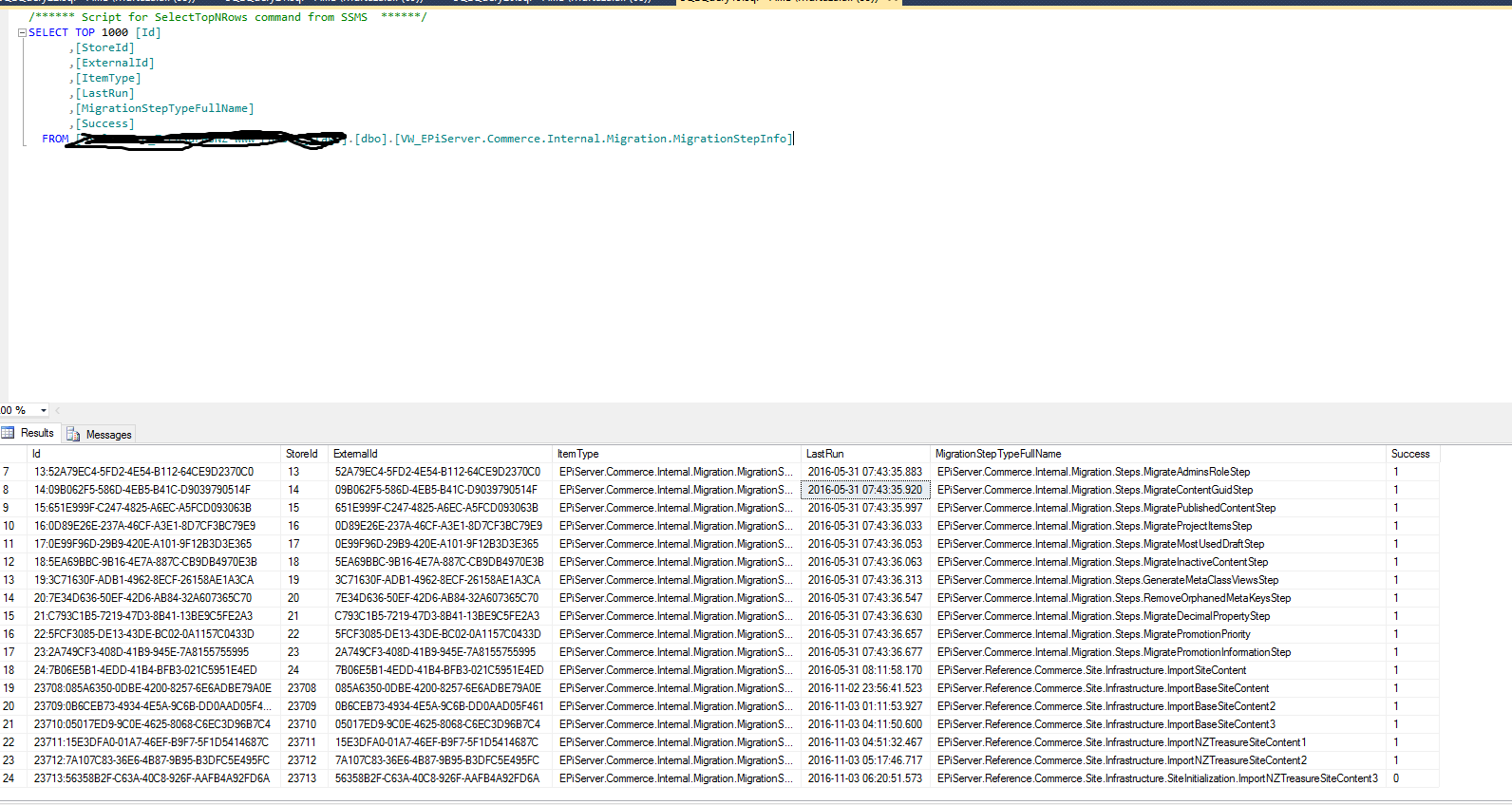
Once you will brows the CMS site it and login with Admin credential, System will provide you the migration step summary. 

Another way to check if migration was run successfully is to look at the view [dbo].[VW_EPiServer.Commerce.Internal.Migration.MigrationStepInfo]) in CMS Site.


Market

By Default EPi Commerce provides IMarket Implementaion MarketImpl but this class does not have setter function to set new values therefore, we will need to add our own class for IMarket interface. We will inherit from the MarketImp in order keep thing simple and easy.


internal class SiteMarketImp : MarketImpl, IMarket
    {
        public new MarketId MarketId { get; set; }
        public new bool IsEnabled { get; set; }
        public new string MarketName { get; set; }
        public new string MarketDescription { get; set; }
        public new CultureInfo DefaultLanguage { get; set; }
        public new IEnumerable<CultureInfo> Languages { get; set; }
        public new Currency DefaultCurrency { get; set; }
        public new IEnumerable<Currency> Currencies { get; set; }
        public new IEnumerable<string> Countries { get; set; }

        /// <summary>
        /// Creates an empty IMarket instance with the specified market identifier.
        /// </summary>
        /// <param name="marketId"></param>
        public SiteMarketImp (MarketId marketId) : base(marketId)
        {
            this.MarketId = marketId;
        }

        /// <summary>Creates a copy of the passed IMarket instance.</summary>
        /// <param name="market">The IMarket instance to copy.</param>
        public SiteMarketImp (IMarket market) : base(market)
        {
            this.MarketId = market.MarketId;
            this.IsEnabled = market.IsEnabled;
            this.MarketName = market.MarketName;
            this.MarketDescription = market.MarketDescription;
            this.DefaultLanguage = market.DefaultLanguage;
            this.DefaultCurrency = market.DefaultCurrency;
        }
    }


Function to Add/Update Market


    private IMarket AddNzMarket()
        {
            MarketId NZ_Market_ID = new MarketId("NZL"); 
            var nzCulture = CultureInfo.GetCultureInfo("en-NZ");
            var nzCurrency = new Currency("NZD");
            var allMarkets = _marketService.GetAllMarkets();
            var nzMarket = allMarkets.FirstOrDefault(m => m.MarketId == NZ_Market_ID);
            bool isCreating = nzMarket == null;
            var updatedNzMarket = isCreating ? new SiteMarketImp (new MarketId("NZL")) : new SiteMarketImp (nzMarket);

            /* Get the country just to make sure it exists */
            var countryDto = CountryManager.GetCountry("NZL", false);

            /* countryDto Table 0 is for State/Province and 1 is for Country 
             * countryDto Row is to get the country code
             */
            if (countryDto == null || countryDto.Tables.Count < 2 || countryDto.Tables[1].Rows.Count < 0)
                throw new ContentNotFoundException("New Zealand Country Could not be found in EPi Commerce");

            /* All the requried fields need to be populated */
            updatedNzMarket.MarketName = "New Zealand";
            updatedNzMarket.MarketDescription = "New Zealand";
            updatedNzMarket.Countries = new List<string> { "NZL" };
            updatedNzMarket.Currencies = new List<Currency> { nzCurrency };
            updatedNzMarket.DefaultCurrency = nzCurrency;
            updatedNzMarket.Languages = new List<CultureInfo> { nzCulture };
            updatedNzMarket.DefaultLanguage = nzCulture;
            updatedNzMarket.IsEnabled = true;

           /* Save NZ Market */
            if (isCreating)
                _marketService.CreateMarket(updatedNzMarket);
            else
                _marketService.UpdateMarket(updatedNzMarket);

            return updatedNzMarket;
        }


Add/Update Warehouses


    private void AddNzWarehouses()
        {
            /* Adding/Updating two ware houses */
            var nzSouth = "NZSouth";
            var nzNorth = "NZNorth";
            var warehouses =_warehouseRepository.List().ToList();

            /* Add/Update South Island Warehouse */
            var nzWarehouse = warehouses.FirstOrDefault(w => w.Code == nzSouth);
            var nzSouthWarehouse= nzWarehouse == null ? new Warehouse() : new Warehouse(nzWarehouse);
            SaveWarehouse(nzSouthWarehouse, nzSouth, "New Zealand South Island Warehouse", true);

            /* Add/Update North Island Warehouse */
            nzWarehouse = warehouses.FirstOrDefault(w => w.Code == nzNorth);
            var nzNorthWarehouse = nzWarehouse == null ? new Warehouse() : new Warehouse(nzWarehouse);
            SaveWarehouse(nzNorthWarehouse, nzNorth, "New Zealand North Island Warehouse", false);
        }   
     private void SaveWarehouse(Warehouse warehouse, string code, string name, bool isPrimary)
        {
            warehouse.ApplicationId = AppContext.Current.ApplicationId;
            warehouse.Code = code;
            warehouse.Name = name;
            warehouse.IsActive = true;
            warehouse.IsPrimary = isPrimary;
            warehouse.IsFulfillmentCenter = true;
            warehouse.IsPickupLocation = false;
            warehouse.IsDeliveryLocation = true;
            warehouse.ContactInformation = new WarehouseContactInformation(warehouse.ContactInformation);
            _warehouseRepository.Save(warehouse);
        }


Add/Update ShippingMethod


  private void AddNzShippingMethod(IMarket market)
        {
            var markets = new List<IMarket> {market};
            foreach (var language in market.Languages.Distinct())
            {
                var languageId = language.TwoLetterISOLanguageName;
                var dto = ShippingManager.GetShippingMethods(languageId);
                DeleteShippingMethods(dto);
                ShippingManager.SaveShipping(dto);

                var shippingSet = CreateShippingMethodsForLanguageAndCurrencies(dto, markets, languageId);
                ShippingManager.SaveShipping(dto);

                AssociateShippingMethodWithMarkets(dto, markets, shippingSet);
                ShippingManager.SaveShipping(dto);
            }
        }

        private void DeleteShippingMethods(ShippingMethodDto dto)
        {
            foreach (var method in dto.ShippingMethod)
            {
                method.Delete();
            }
        }

        private IEnumerable<ShippingMethodDto.ShippingMethodRow> CreateShippingMethodsForLanguageAndCurrencies(ShippingMethodDto dto, IEnumerable<IMarket> markets, string languageId)
        {
            var shippingOption = dto.ShippingOption.First(x => x.Name == "Generic Gateway");
            var shippingMethods = new List<ShippingMethodDto.ShippingMethodRow>();
            var sortOrder = 1;

            var nzdCostRegular = new Money(0, Currency.NZD);

            foreach (var currency in markets.SelectMany(m => m.Currencies).Distinct())
            {
                shippingMethods.Add(CreateShippingMethod(dto, shippingOption, languageId, sortOrder, "Regular-" + currency, string.Format("Regular {0} (4 - 5 days) ({1})", currency, languageId), nzdCostRegular, currency));
            }

            return shippingMethods;
        }

        private ShippingMethodDto.ShippingMethodRow CreateShippingMethod(ShippingMethodDto dto, ShippingMethodDto.ShippingOptionRow shippingOption, string languageId, int sortOrder, string name, string description, Money costInNzd, Currency currency)
        {
            return dto.ShippingMethod.AddShippingMethodRow(
                Guid.NewGuid(),
                shippingOption,
                AppContext.Current.ApplicationId,
                languageId,
                true,
                name,
                "Free Delivery",
                costInNzd.Amount,
                currency,
                description,
                false,
                sortOrder,
                DateTime.Now,
                DateTime.Now);
        }

        private void AssociateShippingMethodWithMarkets(ShippingMethodDto dto, IEnumerable<IMarket> markets, IEnumerable<ShippingMethodDto.ShippingMethodRow> shippingSet)
        {
            foreach (var shippingMethod in shippingSet)
            {
                foreach (var market in markets.Where(m => m.Currencies.Contains<Currency>(shippingMethod.Currency)))
                {
                    dto.MarketShippingMethods.AddMarketShippingMethodsRow(market.MarketId.Value, shippingMethod);
                }
            }
        }