Wednesday, December 7, 2016

Using ExpandoObject with Dictionary to get rid of magic string

In most of the project we used the dictionary and along with dictionary there comes magic string.

In order to get rid of the magic string from code I utilize the ExpandoObject to add/update dictionary item by converting ExpandoObject into dynamic instance.

Usage

 
     Dictionary<string, string> dictoinary = new Dictionary<string, string>();
     dictoinary["FName"] = "Murtaza";
     dictoinary["LName"] = "Ali";
     dictoinary["DOB"] = "1/1/1001";

     var dynamicDictioinary = new DictionaryExpando<string>(dictoinary) as dynamic ;
     dynamicDictioinary.Gender = "Definitely Not Female";
     Console.WriteLine(dynamicDictioinary.FName);
     dynamicDictioinary.FName = "Murtaza Override";
     Console.WriteLine(dynamicDictioinary.FName);
     Console.WriteLine(dynamicDictioinary.Gender);

DictionaryExpando Class

 
    [Serializable]
    class DictionaryExpando<TValue> : DynamicObject
    {
        /// <summary>
        /// Instance of object passed in
        /// </summary>
        public Dictionary<string, TValue> Instance;

        /// <summary>
        /// Cached type of the instance
        /// </summary>
        private Type InstanceType;

        private PropertyInfo[] InstancePropertyInfo
        {
            get
            {
                if (_InstancePropertyInfo == null && Instance != null)
                    _InstancePropertyInfo =
                        Instance.GetType()
                                .GetProperties(BindingFlags.Instance | BindingFlags.Public | BindingFlags.DeclaredOnly);
                return _InstancePropertyInfo;
            }
        }

        private PropertyInfo[] _InstancePropertyInfo;


        public Dictionary<string,TValue> Properties = new Dictionary<string, TValue>();


        /// <summary>
        /// Allows passing in an existing instance variable to 'extend'.        
        /// </summary>
        /// <remarks>
        /// You can pass in null here if you don't want to 
        /// check native properties and only check the Dictionary!
        /// </remarks>
        /// <param name="instance"></param>
        public DictionaryExpando(Dictionary<string, TValue> instance)
        {
            Initialize(instance);
        }


        protected virtual void Initialize(Dictionary<string, TValue> instance)
        {
            Instance = instance;
            if (instance != null)
                InstanceType = instance.GetType();
        }


        /// <summary>
        /// Try to retrieve a member by name first from instance properties
        /// followed by the collection entries.
        /// </summary>
        /// <param name="binder"></param>
        /// <param name="result"></param>
        /// <returns></returns>
        public override bool TryGetMember(GetMemberBinder binder, out object result)
        {
            result = default(TValue);

            // first check the Properties collection for member
            if (Properties.Keys.Contains(binder.Name))
            {
                result = Properties[binder.Name];
                return true;
            }


            // Next check for Public properties via Reflection
            if (Instance != null)
            {
                try
                {
                    return GetProperty(Instance, binder.Name, out result);
                }
                catch
                {
                }
            }

            // failed to retrieve a property
            result = null;
            return false;
        }


        /// <summary>
        /// Property setter implementation tries to retrieve value from instance 
        /// first then into this object
        /// </summary>
        /// <param name="binder"></param>
        /// <param name="value"></param>
        /// <returns></returns>
        public override bool TrySetMember(SetMemberBinder binder, object value)
        {

            // first check to see if there's a native property to set
            if (Instance != null)
            {
                try
                {
                    bool result = SetProperty(Instance, binder.Name, value);
                    if (result)
                        return true;
                }
                catch
                {
                }
            }

            // no match - set or add to dictionary
            Properties[binder.Name] = (TValue)value;
            return true;
        }

        /// <summary>
        /// Dynamic invocation method. Currently allows only for Reflection based
        /// operation (no ability to add methods dynamically).
        /// </summary>
        /// <param name="binder"></param>
        /// <param name="args"></param>
        /// <param name="result"></param>
        /// <returns></returns>
        public override bool TryInvokeMember(InvokeMemberBinder binder, object[] args, out object result)
        {
            if (Instance != null)
            {
                try
                {
                    // check instance passed in for methods to invoke
                    if (InvokeMethod(Instance, binder.Name, args, out result))
                        return true;
                }
                catch
                {
                }
            }

            result = null;
            return false;
        }


        /// <summary>
        /// Reflection Helper method to retrieve a property
        /// </summary>
        /// <param name="instance"></param>
        /// <param name="name"></param>
        /// <param name="result"></param>
        /// <returns></returns>
        protected bool GetProperty(object instance, string name, out object result)
        {
            if (instance == null)
                instance = this;
            result = default(TValue);
            try
            {
                var dictonary = instance as Dictionary<string, TValue>;
                result = dictonary[name];
                return true;

            }
            catch (Exception)
            {
            }

            return false;
        }

        /// <summary>
        /// Reflection helper method to set a property value
        /// </summary>
        /// <param name="instance"></param>
        /// <param name="name"></param>
        /// <param name="value"></param>
        /// <returns></returns>
        protected bool SetProperty(object instance, string name, object value)
        {
            if (instance == null)
                instance = this;

            try
            {
                Dictionary<string, TValue> dictionary = instance as Dictionary<string, TValue>;
                dictionary[name] = (TValue)value;
                return true;
            }
            catch (Exception)
            {
            }

            return false;
        }

        /// <summary>
        /// Reflection helper method to invoke a method
        /// </summary>
        /// <param name="instance"></param>
        /// <param name="name"></param>
        /// <param name="args"></param>
        /// <param name="result"></param>
        /// <returns></returns>
        protected bool InvokeMethod(object instance, string name, object[] args, out object result)
        {
            if (instance == null)
                instance = this;

            // Look at the instanceType
            var miArray = InstanceType.GetMember(name,
                                                 BindingFlags.InvokeMethod |
                                                 BindingFlags.Public | BindingFlags.Instance);

            if (miArray != null && miArray.Length > 0)
            {
                var mi = miArray[0] as MethodInfo;
                result = mi.Invoke(Instance, args);
                return true;
            }

            result = null;
            return false;
        }


        /// <summary>
        /// Convenience method that provides a string Indexer 
        /// to the Properties collection AND the strongly typed
        /// properties of the object by name.
        /// 
        /// // dynamic
        /// exp["Address"] = "112 nowhere lane"; 
        /// // strong
        /// var name = exp["StronglyTypedProperty"] as string; 
        /// </summary>
        /// <remarks>
        /// The getter checks the Properties dictionary first
        /// then looks in PropertyInfo for properties.
        /// The setter checks the instance properties before
        /// checking the Properties dictionary.
        /// </remarks>
        /// <param name="key"></param>
        /// 
        /// <returns></returns>
        public object this[string key]
        {
            get
            {
                try
                {
                    // try to get from properties collection first
                    return Properties[key];
                }
                catch (KeyNotFoundException ex)
                {
                    // try reflection on instanceType
                    object result = null;
                    if (GetProperty(Instance, key, out result))
                        return result;

                    // nope doesn't exist
                    throw;
                }
            }
            set
            {
                if (Properties.ContainsKey(key))
                {
                    Properties[key] = (TValue)value;
                    return;
                }

                // check instance for existance of type first
                var miArray = InstanceType.GetMember(key, BindingFlags.Public | BindingFlags.GetProperty);
                if (miArray != null && miArray.Length > 0)
                    SetProperty(Instance, key, value);
                else
                    Properties[key] = (TValue)value;
            }
        }


        /// <summary>
        /// Returns and the properties of 
        /// </summary>
        /// <param name="includeProperties"></param>
        /// <returns></returns>
        public IEnumerable<KeyValuePair<string, object>> GetProperties(bool includeInstanceProperties = false)
        {
            if (includeInstanceProperties && Instance != null)
            {
                foreach (var prop in this.InstancePropertyInfo)
                    yield return new KeyValuePair<string, object>(prop.Name, prop.GetValue(Instance, null));
            }

            foreach (var key in this.Properties.Keys)
                yield return new KeyValuePair<string, object>(key, this.Properties[key]);

        }


        /// <summary>
        /// Checks whether a property exists in the Property collection
        /// or as a property on the instance
        /// </summary>
        /// <param name="item"></param>
        /// <returns></returns>
        public bool Contains(KeyValuePair<string, object> item, bool includeInstanceProperties = false)
        {
            bool res = Properties.ContainsKey(item.Key);
            if (res)
                return true;

            if (includeInstanceProperties && Instance != null)
            {
                foreach (var prop in this.InstancePropertyInfo)
                {
                    if (prop.Name == item.Key)
                        return true;
                }
            }

            return false;
        }

    }


Instance

The Isntance property will return the real dictionary object to perform additional operations if required. You may need convert dynamic object back into ExpandoObject

 public Dictionary<string, TValue> Instance;
  

TryGetMember and GetProperty

TryGetMember is overridden method of ExpandoObject in order to fetch the value of provided propertyname. The dynamic property name can be retrieved from binder.Name.

GetProperty fetches the value from dictionary for provided key.

 
     public override bool TryGetMember(GetMemberBinder binder, out object result)
        {
            result = default(TValue);

            // first check the Properties collection for member
            if (Properties.Keys.Contains(binder.Name))
            {
                result = Properties[binder.Name];
                return true;
            }


            // Next check for Public properties via Reflection
            if (Instance != null)
            {
                try
                {
                    return GetProperty(Instance, binder.Name, out result);
                }
                catch
                {
                }
            }

            // failed to retrieve a property
            result = null;
            return false;
        }

  protected bool GetProperty(object instance, string name, out object result)
        {
            if (instance == null)
                instance = this;
            result = default(TValue);
            try
            {
                var dictonary = instance as Dictionary<string, TValue>;
                result = dictonary[name];
                return true;

            }
            catch (Exception)
            {
            }

            return false;
        }


TrySetMember and SetProperty

TrySetMember is overridden method of ExpandoObject in order to set the value of provided propertyname. The dynamic property name can be retrieved from binder.Name.

SetProperty sets the value to dictionary for provided key

 
 public override bool TrySetMember(SetMemberBinder binder, object value)
        {

            // first check to see if there's a native property to set
            if (Instance != null)
            {
                try
                {
                    bool result = SetProperty(Instance, binder.Name, value);
                    if (result)
                        return true;
                }
                catch
                {
                }
            }

            // no match - set or add to dictionary
            Properties[binder.Name] = (TValue)value;
            return true;
        }

      protected bool SetProperty(object instance, string name, object value)
        {
            if (instance == null)
                instance = this;

            try
            {
                Dictionary<string, TValue> dictionary = instance as Dictionary<string, TValue>;
                dictionary[name] = (TValue)value;
                return true;
            }
            catch (Exception)
            {
            }

            return false;
        }


Note: If you wan to use the remove function of dictionary then you may still need to use the magic string to remove the key from dictionary.

Saturday, December 3, 2016

Make Every Page In EPiServer As Draggable As Single Tile

In one of our EPiServer Project we wanted to make every page as draggable and wanted to make them appear as single tile. Therefore, I came up with approach, In this approach we will make every base page available to implement ISingleTileView interface and we would register one template coordinator for given Interface.

ISingleTileView


 public interface ISingleTileView
    {
        string Title { get; }
        string TileDescription { get; }
        string ImageUrl { get; }
        string LinkToUrl { get; }
    }


We had 5 different base classes for CMS and ECommerce. All of them are listed below.

  1. SitePageData
  2. SiteBlockData
  3. BaseVariantContent
  4. BaseProductContent
  5. BaseCategory
The Class definitions of above all classes are defined as

SitePageData

 
 public abstract class SitePageData : PageData, ISingleTileView
    {
        public string Title { get; }
        public string TileDescription { get; }
        public string ImageUrl { get; }
        public string LinkToUrl { get; }
    }


SiteBlockData

 
 public abstract  SiteBlockData : BlockData, ISingleTileView
    {
        public string Title { get; }
        public string TileDescription { get; }
        public string ImageUrl { get; }
        public string LinkToUrl { get; }
    }


BaseVariantContent

 
public class BaseVariantcContent : VariationContent, ISingleTileView
    {
        public string Title { get; }
        public string TileDescription { get; }
        public string ImageUrl { get; }
        public string LinkToUrl { get; }
    } 

BaseProductContent

 
public class BaseProductContent : ProductContent, ISingleTileView
    {
        public string Title { get; }
        public string TileDescription { get; }
        public string ImageUrl { get; }
        public string LinkToUrl { get; }
    }


BaseCategory

 
   public class BaseCategory : NodeContent, ISingleTileView
    {
        public string Title { get; }
        public string TileDescription { get; }
        public string ImageUrl { get; }
        public string LinkToUrl { get; }
    }

You can populate above properties with what ever other properties.

We have used below CMS properties to return value of ISingleTileView properties

Assigning Value To ISingleTileView Properties

 
        #region ISingle Tile View

        [Ignore]
        [ScaffoldColumn(false)]
        public string Title
        {
            get { return Heading; }
        }

        [Ignore]
        [ScaffoldColumn(false)]
        public string TileDescription
        {
            get { return Abstract.ToHtmlString(); }
        }

        [Ignore]
        [ScaffoldColumn(false)]
        public string ImageUrl
        {
            get { return this.GetDefaultAsset(AssetMediaNames.THUMBNAIL).GetFriendlyUrl(); }
        }

        [Ignore]
        [ScaffoldColumn(false)]
        public string LinkToUrl
        {
            get { return ContentLink.GetFriendlyUrl(); }
        }

        #endregion

TemplateCoordinator

 
  [ServiceConfiguration(typeof(IViewTemplateModelRegistrator))]
    public class TemplateCoordinator : IViewTemplateModelRegistrator
    {
        public const string BlockFolder = "~/Views/Shared/Blocks/";
        public const string PagePartialsFolder = "~/Views/Shared/PagePartials/";

        public void Register(TemplateModelCollection viewTemplateModelRegistrator)
        {
            // All Pages will be Single Tile View will rendered below Partial view
            viewTemplateModelRegistrator.Add(typeof(ISingleTileView), new TemplateModel()
            {
                Name = "Single Tile View For Any Page",
                Inherit = true,
                Tags = new[] { Constants.TemplateDescriptorTags.SingleTile },
                Path = BlockPath("Single.Tile.cshtml"),
                TemplateTypeCategory = TemplateTypeCategories.MvcPartialView,
                AvailableWithoutTag = true,
                Default = false
            });

        public static string BlockPath(string fileName)
        {
            return string.Format("{0}{1}", BlockFolder, fileName);
        }

        public static string PagePartialPath(string fileName)
        {
            return string.Format("{0}{1}", PagePartialsFolder, fileName);
        }
    }


SingleTile Partial View

In the following path we have our sinlgetileview partial view ~/Shared/Blocks/Single.Tile.cshtml

 
@using EPiServer.Reference.Commerce.Site.Core.Settings
@using EPiServer.Reference.Commerce.Site.Infrastructure.Extensions
@model EPiServer.Reference.Commerce.Site.Core.ContentTypes.TemplateCoordinatorInterface.ISingleTileView
<li>
    <div class="product-item">
<div class="product-item-image" style="background-image: url(@Html.ResizeImageUrl(Model.ImageUrl, preset: AssetMediaNames.ImageResizerPresets.PRODUCT_RANGE_TILE));">
<img alt="@Model.Title" src="@Html.ResizeImageUrl(Model.ImageUrl, preset: AssetMediaNames.ImageResizerPresets.PRODUCT_RANGE_TILE)" />
        </div>
<h2>
@Model.Title</h2>
<div>
@Html.Raw(Model.TileDescription)
        </div>
<a class="btn btn-default" href="@Model.LinkToUrl">More info</a>
    </div>
</li>


Entity Framework Code First Custom Database Initialization and Check if Table Already Exists

In one of our Project we had to use existing database and we wanted to use the code first entity framework as well.

There was requirement to make sure that some of the tables are already existed and all the new ones will be created using the code first approach.

Therefore, I decided to customized the MigrateDatabaseToLatestVersion.

First we will verify that the prerequisite tables are already there and then based on the auto update app setting we will migrate database to latest version.

GiftVoucherDatabaseInitialization 


public class GiftVoucherDatabaseInitialization : MigrateDatabaseToLatestVersion<GiftVoucherEntityTypesConfigurationDbContext, Migrations.Configuration>
    {
        private string IsCodeFirstAutoMigrationEnabled = "IsCodeFirstAutoMigrationEnabled";

        public GiftVoucherDatabaseInitialization(string connectionStringName) : base(connectionStringName)
        {
        }

        public override void InitializeDatabase(GiftVoucherEntityTypesConfigurationDbContext context)
        {
            var queryString = @"
                         SELECT 1 FROM sys.tables AS T
                         INNER JOIN sys.schemas AS S ON T.schema_id = S.schema_id
                         WHERE S.Name = 'dbo' AND T.Name = '{0}'";
            if (context.Database.Exists())
            {
                bool exists = context.Database
                      .SqlQuery<int?>(string.Format(queryString, "tbl_PurchaseVoucher"))
                      .SingleOrDefault() != null;

                if(!exists)
                    throw new ContentNotFoundException("Business Foundataion Entity{PurchaseVoucher} Not Found");

                exists = context.Database
                      .SqlQuery<int?>(string.Format(queryString, "tbl_PurchaseVoucherRedemption"))
                      .SingleOrDefault() != null;

                if (!exists)
                    throw new ContentNotFoundException("Business Foundation Entity{PurchaseVoucherRedemption} Not Found");
            }

            if (IsMigrationEnabled())
            {
                base.InitializeDatabase(context);
            }
        }

        private bool IsMigrationEnabled()
        {
            var migration = ConfigurationManager.AppSettings[IsCodeFirstAutoMigrationEnabled];
            return migration != null && migration.ToLower().Equals("true");
        }
    }

In Global.asax file, we will set the database initializer for above context

Setting Up Database Initializer


        protected void Application_Start()
        {
            // Add the database migration strategy to update the database on app start
            Database.SetInitializer(new GiftVoucherDatabaseInitialization(ConnectionStringConfig.CommerceConnectionStringName));

            // Run the initializer, but don't force
            new GiftVoucherEntityTypesConfigurationDbContext().Database.Initialize(true);
        }


GiftVoucherEntityTypesConfigurationDbContext

The GiftVoucherEntityTypesConfigurationDbContext looks like below


public class GiftVoucherEntityTypesConfigurationDbContext : DbContext
    {
        private readonly ICustomerContextFacade _customerContextFacade;

        public GiftVoucherEntityTypesConfigurationDbContext()
      : this("EcfSqlConnection", null)
     {
      
     }

        public GiftVoucherEntityTypesConfigurationDbContext(string nameOrConnectionString)
            : base(nameOrConnectionString)
        {
            
        }

        public DbSet<PurchaseVoucher> PurchaseVouchers { get; set; }
  public DbSet<PurchaseVoucherRedemption> PurchaseVoucherRedemptions { get; set; }

  protected override void OnModelCreating(DbModelBuilder modelBuilder)
  {
   // Dynamically load all configuration
   var typesToRegister = Assembly.GetExecutingAssembly().GetTypes()
                .Where(type => !string.IsNullOrEmpty(type.Namespace))
                .Where(type => type.BaseType != null && type.BaseType.IsGenericType && type.BaseType.GetGenericTypeDefinition() == typeof(EntityTypeConfiguration<>));
            foreach (var type in typesToRegister)
            {
                dynamic configurationInstance = Activator.CreateInstance(type);
                modelBuilder.Configurations.Add(configurationInstance);
            }
            
            base.OnModelCreating(modelBuilder);
        }
     }

Monday, November 28, 2016

Adding New MetaDataPlus Dictionary Field and Assigning it to Catalog Entry Class

We will be adding new catalog entry class and will be assigning new meta dictionary field with multiple values.

Adding new Catalog Entry (ProductBase) Class


    [CatalogContentType(GUID = "C39413F3-310C-49C6-A4C4-6B86D6788401", MetaClassName = "ProductBase")]
    public class ProductBase  : ProductContent
    {
       [Searchable]
        [IncludeInDefaultSearch]
        [BackingType(typeof(PropertyDictionarySingle))]
        [Display(Order = 60)]
        [Required]
        public virtual string ProductType { get; set; }
    }


Now we will be defining initializing class to add new meta field and assign it to Catalog Entry(ProductBase) class


[ModuleDependency(typeof(ServiceContainerInitialization))]
 [InitializableModule]
 public class CatalogInitialization : IConfigurableModule
 {
  private bool _isInitialized;

  public void Initialize(InitializationEngine context)
  {
   if (_isInitialized)
    return;

   SyncMetaClassAndField();

   _isInitialized = true;
  }

  public void Uninitialize(InitializationEngine context)
  {
   _isInitialized = false;
  }

  public void ConfigureContainer(ServiceConfigurationContext context)
  {
   context.Container.Configure(ctx => ctx.AddRegistry());
  }

  private static void SyncMetaClassAndField()
  {
    var metaProClass = Mediachase.MetaDataPlus.Configurator.MetaClass.Load(MetaDataContext.Instance, "ProductBase");
                  MetaField metaProp = MetaField.Load(MetaDataContext.Instance, "ProductType");

      if (metaProp == null)
      {
                      metaProp = Mediachase.MetaDataPlus.Configurator.MetaField.Create(MetaDataContext.Instance, "Mediachase.Commerce.Catalog", "ProductType", "Product Type", "Product Type Description", MetaDataType.DictionarySingleValue, 1000, false, false, false, false);
                    }
                  metaProp.Dictionary.Add("Baby", "Baby");
                  metaProp.Dictionary.Add("Toddler", "Toddler");
                  metaProp.Dictionary.Add("Junior", "Junior");
                  metaProp.Dictionary.Add("Walker", "Walker");
                  metaProClass.AddField(metaProp);
        }
 }

Friday, November 4, 2016

Using EPiServer IMigratoinSteps To Automatically Add EPi Commerce Market, Warehouse, Payment and Shipping Method

In one of my application i had to setup Initial Market, Mulitple Warehouses, Payment Method and Shipping Method in order to make thing available for editors.

I got some of the help from the QuickSilver ImportSiteContent Class. However, it was missing how to add new market and warehouses.

I will strongly recommend to look at above class to understand more about it.

We will now go through how to add Market, Warehouses, Shipping Method and Payment Method.

IMigrationStep

In one of my question that i asked on EPiServer Forum, the guy replied that IMigrationStep is an internal class and should not be used because it will void the support contract and can have break change impact in future release. So please guys use it with caution.

We will need to decorate our class

[ServiceConfiguration(typeof(IMigrationStep))]


[ServiceConfiguration(typeof(IMigrationStep))]
    public class ImportNZSiteContent : IMigrationStep
    {   
 public int Order { get { return 2010; } }
        public string Name { get { return "Adding Market, Warehouse and Shipping"; } }
        public string Description { get { return "Adding NZ/AU Market, Multiple Warehouses for NZ and Free Shipping method"; } }
  
 public bool Execute(IProgressMessenger processMessenger)
        {
            _progressMessenger =  processMessenger;
            _progressMessenger.AddProgressMessageText("Adding/Updating New Zealand Market and Warehouse", false, 0);
            try
            {
   
     }   
            catch (Exception exception)
            {
                _processMessenger.AddProgressMessageText("ImportTreasureSiteContent failed: " + exception.Message + "Stack trace:" + exception.StackTrace, true, 0);                
                return false;
            }
            return true;
        }
     }

Re-Testing 

The Migration will only run once per database therefore, if you want to re-test then change the name or namespace of the class and re run the site.

Verify Migration Step
Once you will brows the CMS site it and login with Admin credential, System will provide you the migration step summary. 

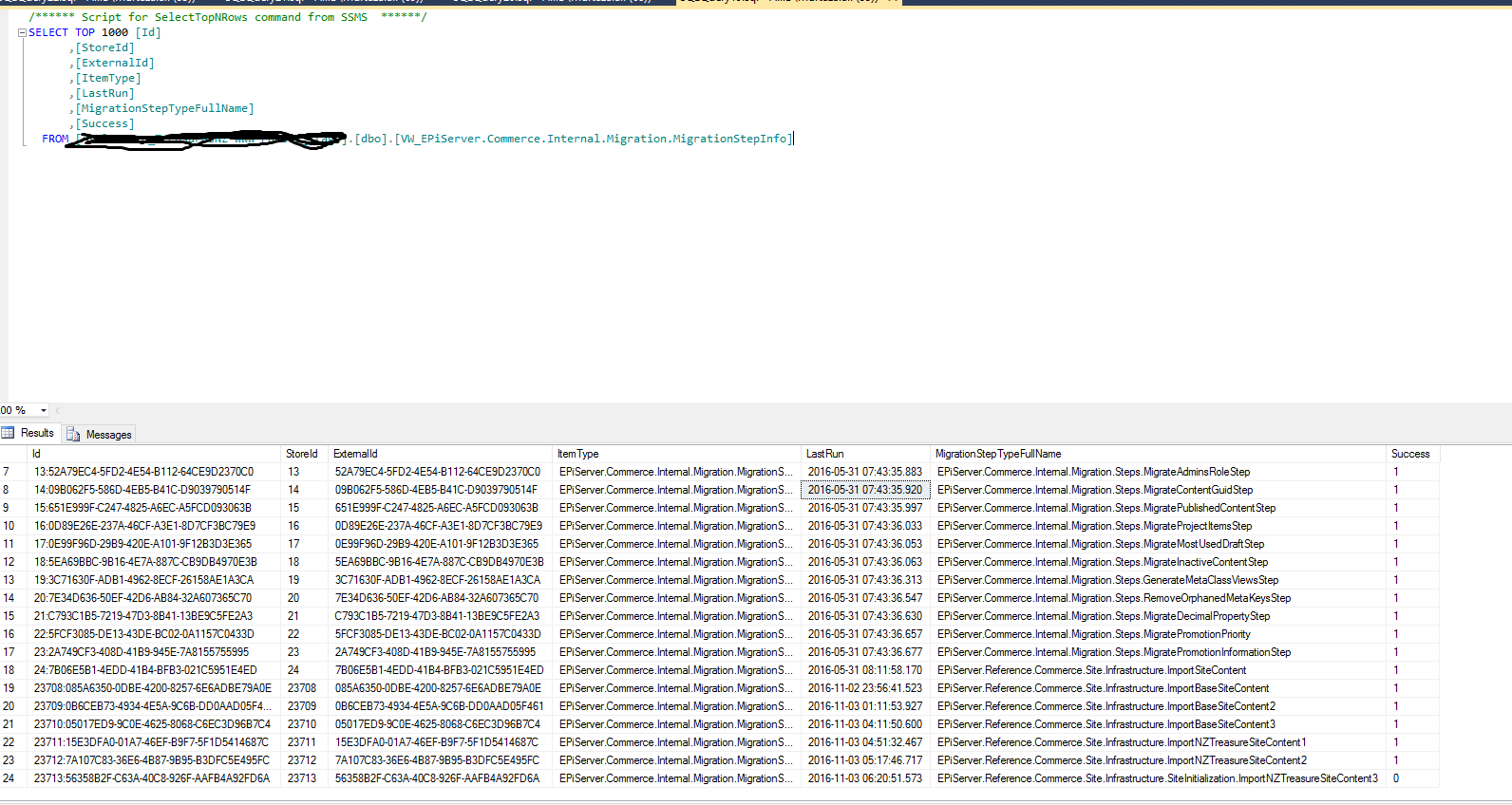
Another way to check if migration was run successfully is to look at the view [dbo].[VW_EPiServer.Commerce.Internal.Migration.MigrationStepInfo]) in CMS Site.


Market

By Default EPi Commerce provides IMarket Implementaion MarketImpl but this class does not have setter function to set new values therefore, we will need to add our own class for IMarket interface. We will inherit from the MarketImp in order keep thing simple and easy.


internal class SiteMarketImp : MarketImpl, IMarket
    {
        public new MarketId MarketId { get; set; }
        public new bool IsEnabled { get; set; }
        public new string MarketName { get; set; }
        public new string MarketDescription { get; set; }
        public new CultureInfo DefaultLanguage { get; set; }
        public new IEnumerable<CultureInfo> Languages { get; set; }
        public new Currency DefaultCurrency { get; set; }
        public new IEnumerable<Currency> Currencies { get; set; }
        public new IEnumerable<string> Countries { get; set; }

        /// <summary>
        /// Creates an empty IMarket instance with the specified market identifier.
        /// </summary>
        /// <param name="marketId"></param>
        public SiteMarketImp (MarketId marketId) : base(marketId)
        {
            this.MarketId = marketId;
        }

        /// <summary>Creates a copy of the passed IMarket instance.</summary>
        /// <param name="market">The IMarket instance to copy.</param>
        public SiteMarketImp (IMarket market) : base(market)
        {
            this.MarketId = market.MarketId;
            this.IsEnabled = market.IsEnabled;
            this.MarketName = market.MarketName;
            this.MarketDescription = market.MarketDescription;
            this.DefaultLanguage = market.DefaultLanguage;
            this.DefaultCurrency = market.DefaultCurrency;
        }
    }


Function to Add/Update Market


    private IMarket AddNzMarket()
        {
            MarketId NZ_Market_ID = new MarketId("NZL"); 
            var nzCulture = CultureInfo.GetCultureInfo("en-NZ");
            var nzCurrency = new Currency("NZD");
            var allMarkets = _marketService.GetAllMarkets();
            var nzMarket = allMarkets.FirstOrDefault(m => m.MarketId == NZ_Market_ID);
            bool isCreating = nzMarket == null;
            var updatedNzMarket = isCreating ? new SiteMarketImp (new MarketId("NZL")) : new SiteMarketImp (nzMarket);

            /* Get the country just to make sure it exists */
            var countryDto = CountryManager.GetCountry("NZL", false);

            /* countryDto Table 0 is for State/Province and 1 is for Country 
             * countryDto Row is to get the country code
             */
            if (countryDto == null || countryDto.Tables.Count < 2 || countryDto.Tables[1].Rows.Count < 0)
                throw new ContentNotFoundException("New Zealand Country Could not be found in EPi Commerce");

            /* All the requried fields need to be populated */
            updatedNzMarket.MarketName = "New Zealand";
            updatedNzMarket.MarketDescription = "New Zealand";
            updatedNzMarket.Countries = new List<string> { "NZL" };
            updatedNzMarket.Currencies = new List<Currency> { nzCurrency };
            updatedNzMarket.DefaultCurrency = nzCurrency;
            updatedNzMarket.Languages = new List<CultureInfo> { nzCulture };
            updatedNzMarket.DefaultLanguage = nzCulture;
            updatedNzMarket.IsEnabled = true;

           /* Save NZ Market */
            if (isCreating)
                _marketService.CreateMarket(updatedNzMarket);
            else
                _marketService.UpdateMarket(updatedNzMarket);

            return updatedNzMarket;
        }


Add/Update Warehouses


    private void AddNzWarehouses()
        {
            /* Adding/Updating two ware houses */
            var nzSouth = "NZSouth";
            var nzNorth = "NZNorth";
            var warehouses =_warehouseRepository.List().ToList();

            /* Add/Update South Island Warehouse */
            var nzWarehouse = warehouses.FirstOrDefault(w => w.Code == nzSouth);
            var nzSouthWarehouse= nzWarehouse == null ? new Warehouse() : new Warehouse(nzWarehouse);
            SaveWarehouse(nzSouthWarehouse, nzSouth, "New Zealand South Island Warehouse", true);

            /* Add/Update North Island Warehouse */
            nzWarehouse = warehouses.FirstOrDefault(w => w.Code == nzNorth);
            var nzNorthWarehouse = nzWarehouse == null ? new Warehouse() : new Warehouse(nzWarehouse);
            SaveWarehouse(nzNorthWarehouse, nzNorth, "New Zealand North Island Warehouse", false);
        }   
     private void SaveWarehouse(Warehouse warehouse, string code, string name, bool isPrimary)
        {
            warehouse.ApplicationId = AppContext.Current.ApplicationId;
            warehouse.Code = code;
            warehouse.Name = name;
            warehouse.IsActive = true;
            warehouse.IsPrimary = isPrimary;
            warehouse.IsFulfillmentCenter = true;
            warehouse.IsPickupLocation = false;
            warehouse.IsDeliveryLocation = true;
            warehouse.ContactInformation = new WarehouseContactInformation(warehouse.ContactInformation);
            _warehouseRepository.Save(warehouse);
        }


Add/Update ShippingMethod


  private void AddNzShippingMethod(IMarket market)
        {
            var markets = new List<IMarket> {market};
            foreach (var language in market.Languages.Distinct())
            {
                var languageId = language.TwoLetterISOLanguageName;
                var dto = ShippingManager.GetShippingMethods(languageId);
                DeleteShippingMethods(dto);
                ShippingManager.SaveShipping(dto);

                var shippingSet = CreateShippingMethodsForLanguageAndCurrencies(dto, markets, languageId);
                ShippingManager.SaveShipping(dto);

                AssociateShippingMethodWithMarkets(dto, markets, shippingSet);
                ShippingManager.SaveShipping(dto);
            }
        }

        private void DeleteShippingMethods(ShippingMethodDto dto)
        {
            foreach (var method in dto.ShippingMethod)
            {
                method.Delete();
            }
        }

        private IEnumerable<ShippingMethodDto.ShippingMethodRow> CreateShippingMethodsForLanguageAndCurrencies(ShippingMethodDto dto, IEnumerable<IMarket> markets, string languageId)
        {
            var shippingOption = dto.ShippingOption.First(x => x.Name == "Generic Gateway");
            var shippingMethods = new List<ShippingMethodDto.ShippingMethodRow>();
            var sortOrder = 1;

            var nzdCostRegular = new Money(0, Currency.NZD);

            foreach (var currency in markets.SelectMany(m => m.Currencies).Distinct())
            {
                shippingMethods.Add(CreateShippingMethod(dto, shippingOption, languageId, sortOrder, "Regular-" + currency, string.Format("Regular {0} (4 - 5 days) ({1})", currency, languageId), nzdCostRegular, currency));
            }

            return shippingMethods;
        }

        private ShippingMethodDto.ShippingMethodRow CreateShippingMethod(ShippingMethodDto dto, ShippingMethodDto.ShippingOptionRow shippingOption, string languageId, int sortOrder, string name, string description, Money costInNzd, Currency currency)
        {
            return dto.ShippingMethod.AddShippingMethodRow(
                Guid.NewGuid(),
                shippingOption,
                AppContext.Current.ApplicationId,
                languageId,
                true,
                name,
                "Free Delivery",
                costInNzd.Amount,
                currency,
                description,
                false,
                sortOrder,
                DateTime.Now,
                DateTime.Now);
        }

        private void AssociateShippingMethodWithMarkets(ShippingMethodDto dto, IEnumerable<IMarket> markets, IEnumerable<ShippingMethodDto.ShippingMethodRow> shippingSet)
        {
            foreach (var shippingMethod in shippingSet)
            {
                foreach (var market in markets.Where(m => m.Currencies.Contains<Currency>(shippingMethod.Currency)))
                {
                    dto.MarketShippingMethods.AddMarketShippingMethodsRow(market.MarketId.Value, shippingMethod);
                }
            }
        }

Friday, October 28, 2016

Pre and Post Action/Function Decorator

In one of the old project, I had to intercept the call for the existing function in order to log and do some stuff therefore, In order to achieve that without modifying the existing function as it was working and was old enough not to touch. Therefore, After going through resources i came across this article which describes the function decorator.

I decided to implement the ActionExtension to implement Pre and Post Interceptor for existing functions.

The ActionExtension function looks like below.

Note: The action interceptor are need to be defined depending on the number of parameters. I had to implement it for action which accepted only two parameters therefore i had two action extension method which accepts two parameters. For different number of parameters you will need to add more action extensions.


 public static class ActionExtension
    {
        public static Action<targ1, targ2> PreProcessor<targ1, targ2>(this Action<targ1, targ2> action, Action<targ1, targ2> preActionToRun, Targ1 tArg1, Targ2 tarArg2)
        {
            return (TRArg1, TRarg2) =>
            {
                /* PreProcessing */
                preActionToRun(tArg1, tarArg2);

                /* Processing */
                action(tArg1, tarArg2);
            };
        }

        public static Action<targ1, targ2> PostProcessor<targ1, targ2>(this Action<targ1, targ2> action, Action<targ1, targ2> postActionToRun, Targ1 tArg1, Targ2 tarArg2)
        {
            return (TRArg1, TRarg2) =>
            {

                /* Processing */
                action(tArg1, tarArg2);

                /* PostProcessing */
                postActionToRun(tArg1, tarArg2);
            };

        }
    }

Wednesday, October 19, 2016

Converting Object Specific Properties to IDictionary<string, Object> Using Lambda Expression

Below function will convert the specific properties of any class to IDictionary<string, object>

The function is  an extension method for object type and takes params array of Expression<Func<T, object>>. The reason for outputting object in Func is to output any primary type such int, long, string, float and etc.

Registration Example Class


public class Registration 
{
        public int RegId {get; set;}
        public string RegName {get; set;}
        public string RegNotRequired {get; set;}
        public DateTime RegDate {get; set;}
        public string RegLocation {get; set;}
}


Example


Registration reg = new Registration 
                            {RegId = 1,
                             RegName = "Murtaza", 
                             RegNotRequired="Not Important", 
                             RegDate="2012-09-19", 
                             RegLocation ="Pakistan"};
IDictionary<string, object> val = reg.AsKeyAndValue(
                                      r => r.RegId, r => r.RegName, 
                                      r => r.RegDate, r => r.RegLocation);


Extension Method


Following function converts the class properties into IDictionary<string, object>


  public static IDictionary<string,object> AsObjectValueDictionary(this T obj,
            params Expression<func<object,string>>[] source)
        {
            Dictionary objectValyeDictionary = new Dictionary();
            foreach (var src in source)
            {
                var keyValue = obj.AsKeyValuePair(src);
                if(!objectValyeDictionary.ContainsKey(keyValue.Key))
                    objectValyeDictionary.Add(keyValue.Key, keyValue.Value);
            }

            return objectValyeDictionary;
        }

Helper Fucntion For Property Name


The below helper method is use to extract the property name from lambda expression


        public static KeyValuePair AsKeyValuePair(this object obj, Expression<func<object, tproperty>> propertyLambda)
        {
            var me = propertyLambda.Body as MemberExpression;
            UnaryExpression ue;
            if (me == null)
            {
                ue = propertyLambda.Body as UnaryExpression;

                if(ue == null)
                    throw new ArgumentException("You must pass a lambda of the form: '() => Class.Property' or '() => object.Property'");

                me = (MemberExpression) ue.Operand;
            }

            string memberName = me.Member.Name;
            var value = obj.GetType().GetProperty(memberName).GetValue(obj, null);
            return new KeyValuePair(me.Member.Name, value);
        }